CHAPTER 10
Combat
Combat combines activation order, power allocation, movement, facing, line of fire, speed, attack strength, defense, and damage into one tactical decision.
ACTIVATION ORDER
Every eligible ship acts before any ship acts again
Faction initiative follows arrival order. Each faction activates one available unit in order, repeating that sequence until all available units have completed the round. Enemy and allied AI units act automatically.
A unit repairs and recharges before acting. A new round begins only after every surviving faction has completed all available unit moves.
Hold Skip Round to end your faction’s remaining activations for this round. Unused power remains assigned to defense.
PLOT A COURSE
Movement, facing, and speed
- 1
Activate a unit
Select one of your available units. Its valid destinations and targets are highlighted.
- 2
Choose a legal destination
Choose a highlighted destination along a straight line on the hex grid. Movement markers account for class, facing, occupied zones, and astral objects.
- 3
Review targets
Targets available from the planned destination receive crosshairs. Moving consumes power that cannot then be assigned to weapons or defense.
- 4
Commit movement
Use Set Power to choose attack allocation or Defend Only and execute the planned order. If a target is already available, you may fire without moving.
Turning in place produces speed 0. Moving one zone produces a 10-percent speed modifier, moving two produces 20 percent, and each additional zone adds another 10 percent.
ESTABLISH A SHOT
Targeting and line of fire
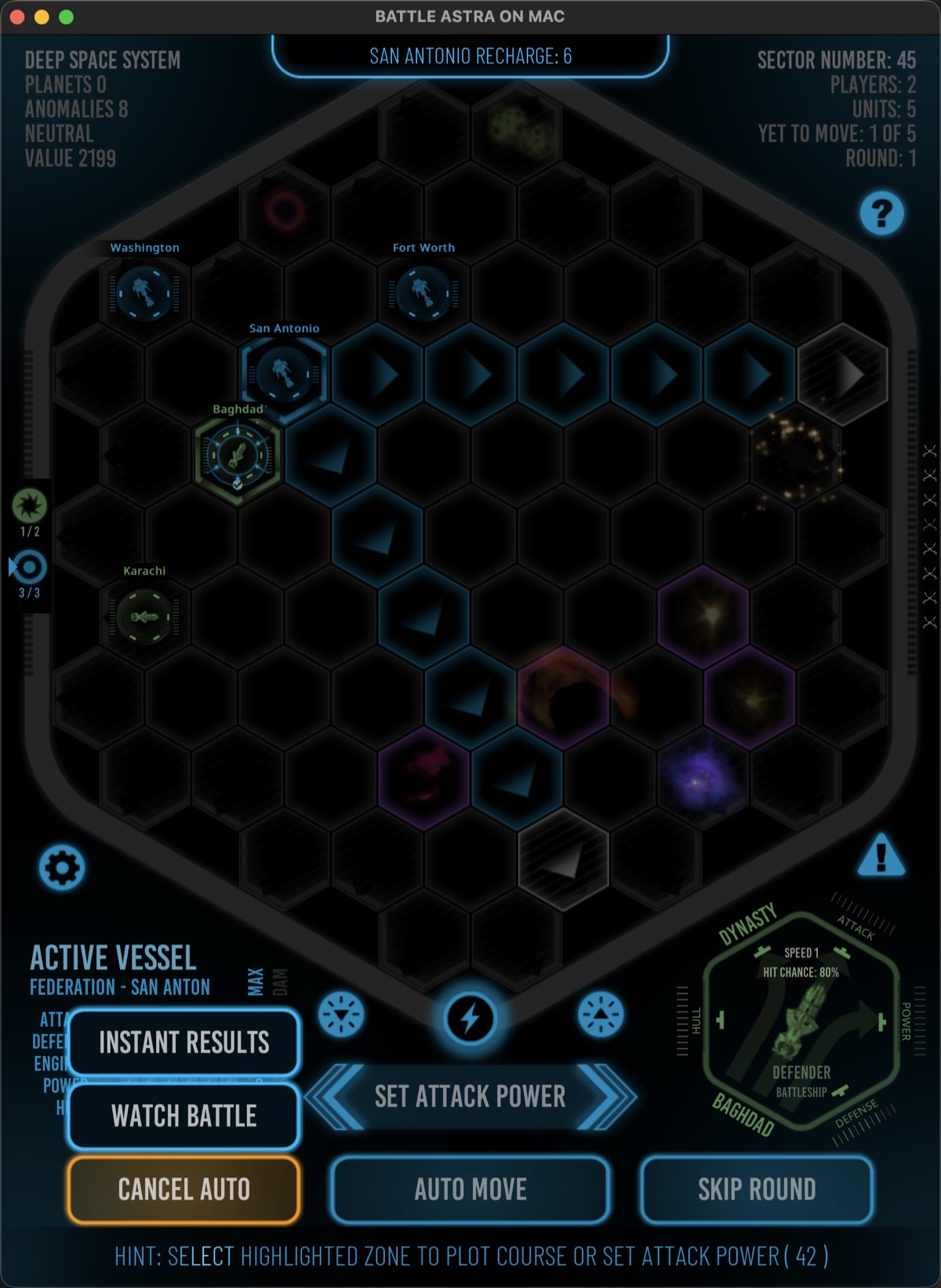
Select an enemy to inspect it and display the best available path or shot. In-range targets use crosshairs and a pulsing dotted line toward the defender. Out-of-range enemies remain available in the target HUD for inspection.
A scan stops at the first ship encountered along a firing line. A ship cannot shoot through another ship to reach a target behind it.
The firing direction must match a gunport available to the attacker’s class and facing. Astral objects and occupied zones can prevent an otherwise favorable shot.
RESOLVE THE ATTACK
Hit chance, defense, and damage
Target defense, target speed, and distance affect the displayed hit chance. Weapons power determines the displayed maximum damage. Movement and weapons fire follow straight lines on the hexagonal grid.
Weapon fire can appear as a salvo while damage messages catch up behind the animation. The event log records the total damage from the attack rather than listing every torpedo separately.
Damage reduces system capacity and can destroy the ship. The attacker and defender HUD diagrams update as the result is applied.
FINAL COMMAND
Self-destruct as a tactical weapon
Hold the warning-colored Self-Destruct icon to destroy the active mobile ship. Stationary units, including outposts and star bases, cannot self-destruct.
The blast equals the ship’s undamaged factory power capacity plus one roll from 1 through that same capacity. Current power damage does not weaken the explosion. The shared total is applied to every adjacent mobile ship, regardless of faction, after shield reductions.
Friendly ships can suffer collateral damage or be destroyed, but friendly-fire losses do not award kill points. Because the blast can remove the final opposing ship, battle victory and end conditions are checked immediately after the damage is resolved.
One shared blast total
Add factory power to one roll from 1 through factory power, then apply that total to every adjacent mobile ship. Default ranges are Escort 7–12, Destroyer 10–18, Cruiser 13–24, and Battleship 16–30; Hull / Power ability bonuses raise the range.
Friend and foe
Faction does not protect a nearby ship. Shields absorb the blast before remaining damage is applied.
Tactical AI choice
AI factions weigh potential damage, friendly risk, ship condition, and aggression before self-destructing in visible or hidden battles.
Immediate resolution
The battle checks for victory or completion as soon as the explosion and resulting destruction are resolved.
The active ship is always destroyed. Before committing, inspect every adjacent zone and compare the possible enemy damage with the risk to friendly ships.
COMPLETE THE ROUND
Repair, recharge, and continue
Repairs and recharge happen before a unit’s activation. After it completes its action, the next faction with an available unit acts.
When every surviving ship has acted or been completed, the round resets and the same faction initiative order begins again.
Battle-end checks run as units are destroyed or retreat. Review the victory result when resolution is complete.