CHAPTER 04
Campaign Setup
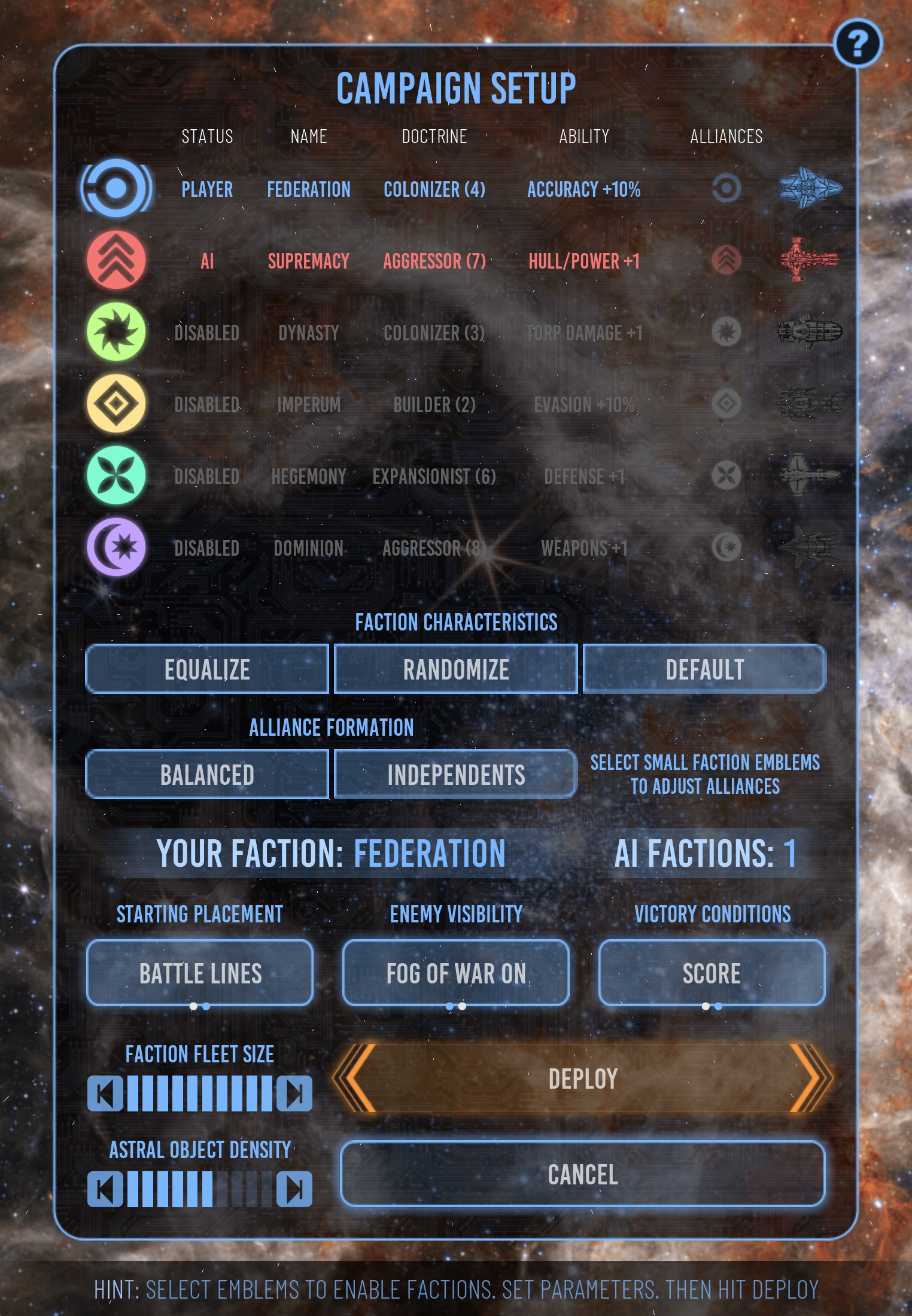
Campaign setup determines who will fight, the character of each faction, the size of their forces, and the structure of the 115-sector region.
ACTIVE ROSTER
Choose two to six factions
The setup table keeps every roster position visible while clearly identifying which factions will participate.
- 1
Select active factions
Select anywhere on a faction row to add or remove it. At least two factions must participate. STATUS shows PLAYER, AI, or DISABLED.
- 2
Choose your faction
The first active faction is the player. To choose another, deselect the current player, then select the new faction first.
- 3
Review faction character
Check NAME, DOCTRINE, ABILITY, and the ship image. Use Balanced or Independents for a quick alliance arrangement, then select the small alliance-leader emblems to fine-tune it.
Deploy and other setup controls remain unavailable when fewer than two factions are active.
WAR SCALE
Set faction fleet size
Faction fleet size uses a ten-level rheostat. It controls the overall number and value of ships assigned to each faction at the start of the war.
The number represented by each level changes with the roster size. Two-faction campaigns can support larger forces per faction; six-faction campaigns use smaller forces so the shared region remains playable.
Starting ships are distributed among the faction’s opening sectors, with at least three mobile ships assigned to the star-base sector. Stationary units are not counted as fleet ships.
REGION CONTENTS
Set astral-object density
Astral-object density controls how many stars, planets, and other objects are distributed through the campaign region and its tactical maps.
Greater density raises potential sector values but can restrict movement. Objects can obstruct both movement and weapons fire on the tactical map.
STARTING TERRITORY
Choose a placement pattern
Battle Lines
Uses structured starting regions selected for the number of factions, giving each side a coherent opening territory.
Random Start
Distributes faction starts across the region for a less predictable strategic opening.
VICTORY CONDITIONS
Choose Score or Elimination
Race to the target
Score is the default. The first surviving faction to reach the generated victory target wins; the campaign also ends if only one faction or alliance remains.
Fight to the last side
The score target is disabled. The war continues until only one active faction or alliance remains, or until the human-controlled faction is eliminated.
BEGIN THE WAR
Deploy the campaign
Select Deploy to generate the region, assign territories and units, calculate sector values, apply the selected victory condition, and open the war map.
The setup screen displays a wait indicator while the region is being built. Do not select other controls until the war map appears.
MAP VISIBILITY
Choose fog of war
Fog of War limits the quadrant to explored and detected sectors. Your view uses the strongest current exploration and detection supplied by any member of your alliance. With fog disabled, the entire quadrant is visible from the start.
Select the help icon for campaign setup guidance. Cancel returns to the start screen; Deploy constructs the quadrant and places the factions.